
BLOGGER TUTORIAL AND TRICKS N0-04
Meta Tag in Blogger
Meta tags, especially description tag and keyword tag, are the most important tag for SEO in Blogger. Meta tags allow search engine spider crawl and index your website more accurately. In other words, meta tags tell the search engine what your website about and how they display your page in search result pages.
Beside description and keywords meta tag, you can use some other tags help for SEO like robots tag, author tags, open graph tag:
#Description and Keywords: provide information of your page.
#Author: tell everybody author of this post.
#Robots: tell the search engine spider how to treat your page. You can't prevent the spider from crawling and indexing your page and many other thing.
#Open Graph: mark by property attribute with og value like og:title, og:type, og:site_name etc. This tag is used by Facebook to display your blog exactly.

Using Meta Tag Description and Keywords in Blogger
There are 2 ways to adding meta tag description and keywords to Blogger, by Settings and by HTML Editor. Please read Blogger How 4 - SEO Techniques for Blogger for complete information about using meta tag.
About Dynamic Meta Tag
What is Dynamic Meta Tag?
If you ever used Wordpress, you would notice that some wordpress SEO plugins always have a dynamic meta tag function. It will generate a different tag for each post, not just the same keywords or description like default Blogger Meta tag.
Where do the different tags come from? The plugins will get description and keywords from post title, labels (tags, categories) and some words from post content. Some Wordpress plugins support this function are SEO Ultimate, All-in-one SEO Pack, Wordpress SEO by Yoast.
Why Dynamic?
Well, with the default meta tag, every page of your blog will have the same tag. That's mean the search engine can not clearly know about your page content, and will treat all page the same way. That's called "duplicate meta tag"and definitely not good for SEO.
Dynamic Meta Tag Generator 1.2 for Blogger/Blogspot
Dynamic Meta Tag Generator by HoweBlog helps you generate dynamic tag for Blogger/Blogspot with your desire keywords. There are some advantages:
#Getting keywords and description from your post title.
#Use your owd keywords along with auto keywords.
#Support dynamic meta tag for every page of Blogger.
#Support open graph meta tag use for social media network such as Facebook.
#Easy to use.
Read More: Part 2
BLOGGER TUTORIAL AND TRICKS N0-03
How To Use
1.Go to Howeblog > Tools > Dynamic Meta Generator
2.Fill in all fields to make the tool work properly. Author and Robots is optional. You can use the same description and keywords at Homepage and Post page.

3.Click Generate Meta Tag to get the code, then select all and copy this.
4.Backup your template, then go to your blog Dashboard > Template > Edit HTML.
5.Find
<b:include data='blog' name='all-head-content'/>
6.Paste the code copied in step 3. If there is already have old meta tag, then replace them with the new one. You should replace old meta description, meta keywords, meta og, meta robots and meta author. If you still keep old meta tag, the lower position tag will be used.

7.Save your template and you're done.
After these step, please go to your blog and check meta tag at some pages to make sure everything work fine. For error report, please comment at this post, I will reply in 24h.
BLOGGER TUTORIAL AND TRICKS N0-02
Add meta tags to your website or blog to get more traffic from search engines like Google,Yahoo,Bing,Aol etc.Especially the meta description is the most important one for SEO.Meta tags are the tags which describes your website/blog and tells the search engines what your site is about. Adding meta tags is an important factor in SEO.(Search Engine Optimization).Meta tags allows search engines to index your web pages more accurately. In other words,Meta tags communicate with the search engines and tells moreall information of your site/blog and make it index correctly and accurately In Serach Engine.
-->
1.Go to "Template" --> "Edit HTML" of your blog.
+blogs.png)
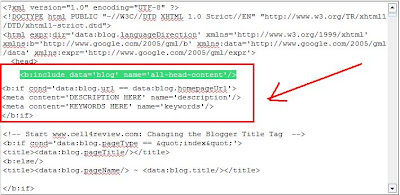
2.Find this code:
<b:include data='blog' name='all-head-content'/>
3.Now add the below code just after the above code.
<meta content='DESCRIPTION HERE' name='description'/>
<meta content='KEYWORDS HERE' name='keywords'/>
<meta content='AUTHOR NAME HERE' name='author'/>
Look at the example below:
+blogs.jpg)
Replace,
DESCRIPTION HERE: Write your real blog description
KEYWORDS: Write the keywords of your blog
AUTHOR NAME: Write the author's name(Your name)
Now save your template. You have successfully added meta tags to your blogger blog.
@bloggertrickstutorialtemplate
BLOGGER TUTORIAL AND TRICKS N0-01
--> If you don't know what meta tags are, and the importance of adding meta tags, here is the detailed article on how to add them to your blogger(blogspot) blogs or any website.
Adding meta tags is very important if you want to get some good traffic from search engines like google,yahoo,msn,etc,especially the meta description part is the most important one.
If you don't know what meta tags are,Meta tags are the tags which describes your site and tells the search engines what your site is all about. Adding meta tags is an important factor in Organic Search Engine Optimization (SEO). Meta tags allows search engines to index your web pages more accurately. In other words,Meta tags communicate with the search engines and tells more information about your site and make your webpages index correctly and accurately.
Here is an example. This is what I got when I typed 'Blogger Tricks' in the Google Search Engine.

As you can see in the above screenshot, " Blog about Blogger Tips, Blogger Templates, Widgets, hacks, Blogger Tricks,etc. " is the meta tags description which I added to my site.
You have to add two meta tags to the head section of your blogger template. One is the Meta description which describes your site and another one is Meta Keywords which tells about your site keywords(what your site is all about).
Here is how to add meta tags to your blogger(blogspot) blog:
1.Sign in to your blogger dashboard>Select the 'Design' link[see the screenshot below]

2.Click on the 'Edit html' tab
.jpg)
Here is the code you have to add
<meta content='DESCRIPTION HERE' name='description'/>
<meta content='KEYWORDS HERE' name='keywords'/>
<meta content='AUTHOR NAME HERE' name='author'/>
DESCRIPTION HERE:Write your blog description
KEYWORDS:Write the keywords of your blog
AUTHOR NAME:Write the author's name(Your name)
{ UPDATE : }
Now..You don't need to do it manually.. I created an automatic Meta Tags Generator to make this process easy for you!
Just go to this page and Enter some basic information like keywords,description,etc.. It will automatically generate you error free, effective Meta tags. Once done, copy that code and follow the next step.
3.Add the above code just after this [Look at the below screenshot]
<b:include data='blog' name='all-head-content'/>
1.jpg)
Don't forget to add description and keywords.
and save the changes.
IMPORTANT:
Many people are just filling the meta description with keywords. DON'T DO THAT. Google and other search engines will ban your site from the search engines list if you repeat your keywords too often. Make sure you don't repeat any keyword more than 3 times.
That's it!You have successfully added the metatags to your blogger(blogpsot) blog.If you want to check whether you added the meta tags correctly or not,just type 'meta tags analyzer tool' in the google and you will find so many sites which can check whether you have added the tags correctly or not.
©bloggertrickstutorialtemplate


